
Industrial Sensor Buying Guide: Photoelectric, Laser, LiDAR, Proximity & Vision Sensors Explained
Industrial sensors are essential for modern automation systems. They are used to detect products, measure distance, confirm position, monitor flow, read codes, protect operators and send signals back to PLCs, drives and control panels. Choosing the right sensor is important because the wrong type can cause missed detections, false triggers, machine downtime and unreliable automation.
This industrial sensor buying guide explains the most common sensor types, including photoelectric sensors, laser sensors, LiDAR sensors, proximity sensors, vision sensors, code readers and flow sensors. It also explains where each type is used and how to choose the right option for conveyors, packaging lines, production machinery, safety systems and factory automation.
At Drive Outlet Megastore, we supply a wide range of Industrial Sensors, including Photoelectric Sensors, Laser Scanners, LiDAR Sensors, Code Readers, Industrial Cameras, Encoders and automation components from leading industrial brands.
What Are Industrial Sensors?
Industrial sensors are devices that detect a physical condition and convert it into an electrical signal. That signal can then be used by a PLC, relay, inverter drive, safety controller or machine control system.
Sensors can detect many different conditions, including:
- Product presence or absence
- Object position
- Distance and height
- Speed and movement
- Flow rate
- Colour, shape or label position
- Barcode or 2D code data
- Safety zone intrusion
- Machine guarding status
In a typical automation system, sensors are connected to PLC input modules, safety relays, drives, HMIs or dedicated controllers. A correctly selected sensor makes the system more reliable, accurate and easier to troubleshoot.
Photoelectric Sensors Explained
Photoelectric sensors are one of the most common types of industrial sensors. They use a light beam to detect the presence or absence of an object. They are widely used on conveyors, packaging machines, material handling systems, bottling lines, food production equipment and automated machinery.
Photoelectric sensors are popular because they can detect objects without physical contact. This makes them ideal for fast-moving products, delicate items, boxes, bags, bottles, cartons and parts moving through production lines.
Common Photoelectric Sensor Types
- Through-beam sensors: Use a separate transmitter and receiver. They are very reliable for longer detection distances.
- Retro-reflective sensors: Use a reflector to bounce the beam back to the sensor. These are common for conveyor product detection.
- Diffuse sensors: Detect light reflected directly from the object. These are easy to install where reflectors are not practical.
- Background suppression sensors: Detect objects at a set distance while ignoring backgrounds behind them.
Best Uses for Photoelectric Sensors
- Detecting products on conveyors
- Counting items on production lines
- Checking box or pallet presence
- Detecting gaps between products
- Triggering labelling, printing or scanning systems
- Jam detection on packaging machines
Photoelectric sensors are usually the first choice when the application involves non-contact detection of moving products.
Laser Sensors and Laser Scanners Explained
Laser sensors use focused laser light to detect objects, measure distance or check position. Compared with standard photoelectric sensors, laser sensors can offer more precise detection and are often used where accuracy is important.
Laser scanners can monitor wider areas and are often used for machine safety, object detection, area monitoring, AGV systems, automated machinery and industrial positioning applications.
Best Uses for Laser Sensors
- Precise distance measurement
- Small part detection
- Height or level detection
- Position checking
- Edge detection
- Object profiling
Best Uses for Laser Scanners
- Safety zone monitoring
- Machine guarding
- Automated guided vehicle detection
- Area protection
- Object tracking
- Conveyor and robot cell monitoring
If the application needs accurate measurement or wide-area monitoring, a laser sensor or laser scanner may be better than a standard photoelectric sensor.
LiDAR Sensors Explained
LiDAR sensors use light detection and ranging technology to measure distance and detect objects across a defined area. They are often used where a sensor needs to understand the shape, position or distance of objects rather than simply detect whether something is present.
LiDAR sensors are useful for applications where multiple objects, larger areas or variable distances need to be monitored. They are commonly used in logistics, warehousing, robotics, safety systems, automated vehicles and advanced machine automation.
Best Uses for LiDAR Sensors
- Area monitoring
- Object detection over wider zones
- Automated vehicle guidance
- Pallet and package detection
- Distance measurement
- Robot cell monitoring
- Warehouse automation
LiDAR sensors are a strong option when a simple single-point sensor is not enough and the system needs wider detection coverage.
Proximity Sensors Explained
Proximity sensors detect objects without physical contact. They are commonly used to confirm the position of metal parts, machine guards, cylinders, tooling, fixtures and moving machine components.
The most common type is the inductive proximity sensor, which detects metal objects. Capacitive proximity sensors can detect some non-metallic materials, depending on the application and setup.
Best Uses for Proximity Sensors
- Detecting metal parts
- Confirming cylinder position
- Machine position feedback
- Guard door or fixture detection
- Rotary and indexing machine feedback
- End-of-travel detection
Proximity sensors are often used where the target object is metal and the detection distance is short. They are rugged, compact and well suited to industrial machinery.
Vision Sensors and Industrial Cameras Explained
Industrial cameras and vision sensors are used when a machine needs to inspect more than just presence or absence. They can check shape, position, orientation, label presence, colour, print quality, product defects and alignment.
Vision systems are common in packaging, electronics, automotive, food production, pharmaceutical production and quality control applications.
Best Uses for Vision Sensors and Cameras
- Product inspection
- Label detection
- Print and date code checking
- Part orientation checking
- Quality control
- Defect detection
- Robot guidance
- Dimension and shape checking
If the application needs to “see” and interpret a product rather than simply detect it, a camera or vision sensor is usually the better choice.
Code Readers Explained
Code readers are used to read barcodes, QR codes and 2D data matrix codes on products, packaging, labels and components. They are essential for traceability, stock control, production tracking and automated identification.
Code readers are commonly used in logistics, packaging, pharmaceutical production, automotive manufacturing, electronics and warehouse automation.
Best Uses for Code Readers
- Barcode reading
- QR code reading
- 2D data matrix code reading
- Product traceability
- Batch tracking
- Label verification
- Warehouse sorting systems
For automated production and logistics systems, code readers help connect physical products to digital tracking systems.
Flow Sensors and Flow Meters Explained
Flow meters and flow sensors are used to measure or monitor the movement of liquids, gases or air through a system. They are commonly used in process control, cooling systems, pumps, water treatment, manufacturing and fluid handling applications.
Best Uses for Flow Sensors
- Monitoring cooling water flow
- Pump system monitoring
- Process liquid measurement
- Air and gas flow monitoring
- Detecting blocked filters or pipework
- Protecting machinery from low-flow conditions
Flow sensors are important where a machine or process depends on a reliable flow of liquid or air.
Encoders vs Sensors: What Is the Difference?
Encoders are often grouped with sensors, but they are normally used for motion feedback rather than simple object detection. An encoder measures shaft rotation, speed, position or movement and sends this information to a PLC, drive, servo controller or motion control system.
Use an encoder when the system needs to know:
- How fast a motor or shaft is turning
- How far a conveyor has moved
- The position of a rotating axis
- Whether a belt is slipping
- Whether two machine sections are synchronised
Use a sensor when the system needs to detect an object, distance, flow, presence, safety zone or machine status. In many automation systems, sensors and encoders work together.
How Sensors Connect to PLCs and Automation Systems
Most industrial sensors connect to a PLC input module, safety relay, machine controller, inverter drive or control interface. The type of signal depends on the sensor and the application.
Common sensor output types include:
- PNP output: Common in many European automation systems.
- NPN output: Common in some machine control systems and older installations.
- Relay output: Used where a simple switching contact is required.
- Analogue output: Used for measurement signals such as distance, pressure or flow.
- IO-Link: Used for advanced sensor diagnostics and parameter setting.
- Ethernet or fieldbus: Used for cameras, code readers and advanced automation devices.
Drive Outlet Megastore supplies automation modules that can be used with industrial sensors, including Omron Modules, Siemens Simatic S7-1200 Modules, IFM Electronic Modules and Pepperl+Fuchs Modules.
How to Choose the Right Industrial Sensor
Choosing the right sensor depends on what needs to be detected, the environment, the required range and the type of signal needed by the control system.
1. Identify What You Need to Detect
Start by deciding whether the sensor needs to detect a product, a metal part, a code, a safety zone, a liquid flow, a distance or a position. Different sensor types are designed for different tasks.
2. Check the Detection Distance
Short-range applications may only need a proximity sensor or diffuse photoelectric sensor. Longer-range detection may require a through-beam photoelectric sensor, laser sensor or LiDAR sensor.
3. Consider the Target Material
The material matters. Metal parts, cardboard boxes, clear bottles, black rubber, reflective packaging and transparent film can all behave differently depending on the sensor technology.
4. Check the Environment
Dust, water, oil, vibration, temperature, washdown, sunlight and electrical noise can all affect sensor performance. Always check the IP rating, housing material and environmental specification.
5. Confirm the Output Signal
Before ordering a replacement sensor, check whether the machine needs PNP, NPN, relay, analogue, IO-Link or communication-based output. Replacing a sensor with the wrong output type can stop the machine working correctly.
6. Match the Connector and Cable Type
Sensor connector type and cable length are important. Many industrial sensors use M8 or M12 connectors, while some use fixed cable. You may also need suitable industrial cables for replacement or installation.
Common Industrial Sensor Buying Mistakes
Choosing the Wrong Sensor Type
A proximity sensor cannot replace a photoelectric sensor in every application, and a standard photoelectric sensor may not replace a laser sensor where precise measurement is needed.
Ignoring PNP and NPN Output Type
PNP and NPN sensors are wired differently. If you replace one with the wrong type, the PLC input may not work correctly.
Not Checking Detection Range
Detection range must match the application. A sensor with too little range may fail to detect the object, while a sensor with too much range may detect unwanted backgrounds.
Forgetting the Environment
Sensors installed in washdown, dusty or high-vibration areas need the correct protection rating and housing design.
Using a Basic Sensor Where a Vision System Is Needed
If the machine needs to inspect labels, orientation, codes or product defects, a standard sensor may not be enough. A camera, vision sensor or code reader may be required.
Industrial Sensor Applications
Industrial sensors are used across almost every type of automated machine. Common applications include:
- Conveyor product detection
- Packaging line automation
- Warehouse sorting systems
- Machine safety and guarding
- Robotic cells
- Food and beverage production
- Pharmaceutical manufacturing
- Automotive production
- Print and label inspection
- Water treatment and pump systems
- Material handling equipment
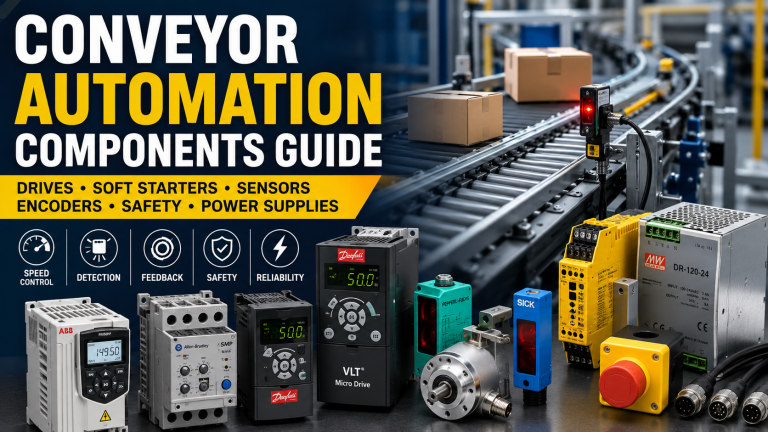
For conveyor and machine automation systems, sensors are often used together with Inverter Drives, Soft Starts, Safety Relays, Power Supplies and PLC modules.
Shop Industrial Sensors and Automation Components
Use the links below to browse relevant industrial sensor and automation categories at Drive Outlet Megastore:
- Sensors
- Photoelectric Sensors
- Laser Scanners
- LiDAR Sensors
- Code Readers
- Industrial Cameras
- Flow Meters
- Encoders
- Safety Light Curtain Senders
- SICK Safety Controllers
- IFM Electronic Modules
- Pepperl+Fuchs Modules
- Omron Modules
- Siemens Simatic S7-1200 Modules
- Cables
Industrial Sensor FAQs
What is the most common industrial sensor?
Photoelectric sensors are one of the most common industrial sensor types because they are reliable, non-contact and widely used for product detection on conveyors and packaging lines.
What is the difference between a photoelectric sensor and a proximity sensor?
A photoelectric sensor uses light to detect objects, while a proximity sensor usually detects nearby metal objects using an electromagnetic field. Photoelectric sensors are better for general product detection, while proximity sensors are often used for machine position and metal part detection.
When should I use a laser sensor?
Use a laser sensor when the application requires precise detection, distance measurement, small part detection or accurate positioning.
What is a LiDAR sensor used for?
LiDAR sensors are used for area monitoring, object detection, distance measurement, automated vehicles, robot cells and warehouse automation where wider detection coverage is needed.
Do I need a vision sensor or a standard sensor?
Use a standard sensor for simple presence, absence or position detection. Use a vision sensor or camera when the machine needs to inspect shape, orientation, labels, codes, defects or product quality.
What does PNP and NPN mean on a sensor?
PNP and NPN describe the switching output type of the sensor. The correct type depends on the PLC input wiring and control system design. Always match the replacement sensor to the existing machine wiring.
Need Help Finding the Right Industrial Sensor?
Drive Outlet Megastore supplies industrial automation sensors, code readers, encoders, safety components, modules, cables and control panel parts for machinery, production lines and factory automation systems.
Browse our industrial sensor categories online or search by part number to find replacement sensors and automation components from SICK, IFM, Pepperl+Fuchs, Omron, Siemens, Allen Bradley and other leading industrial brands.